

Get The Important Preparation Guide With 010-160 Dumps
Get Totally Free Updates on 010-160 Dumps PDF Questions
Lpi 010-160 exam is an important certification exam for individuals who want to demonstrate their knowledge and understanding of Linux essentials. 010-160 exam is designed to assess the candidate's ability to perform basic tasks on the Linux operating system, including using common Linux utilities and commands, managing files and directories, and understanding permissions and ownership. By passing 010-160 exam, candidates can prove to potential employers that they have the necessary skills to work with Linux, which is an important skill in many industries.
The Linux Essentials Certificate is an excellent starting point for individuals who are interested in learning about Linux. Linux Essentials Certificate Exam - version 1.6 certification provides a solid foundation for further study and can be used as a stepping stone to more advanced Linux certifications, such as the LPIC-1 or LPIC-2 certifications. Linux Essentials Certificate Exam - version 1.6 certification is also valuable for individuals who work in IT and want to demonstrate their knowledge of Linux to potential employers.
NEW QUESTION # 14
What is true about a recursive directory listing?
- A. It includes details of file system internals, such as inodes.
- B. It includes ownership information for the files.
- C. It includes the permissions of the directory listed.
- D. It includes the content of sub-directories.
- E. It includes a preview of content for each file in the directory.
Answer: D
Explanation:
Explanation
A recursive directory listing is a way of displaying the files and folders in a directory and all its sub-directories. The recursive option can be used with various commands, such as ls, find, or dir, to list the files recursively. For example, the command ls -R will list all the files and folders inthe current directory and any sub-directories, showing the hierarchy of the file system123 A recursive directory listing does not include the permissions, ownership, or file system details ofthe files, unless specified by other options. For example, the command ls -lR will list the files recursively and also show the permissions, ownership, size, and modification date of each file1 A recursive directory listing also does not include a preview of the content of each file, unless specified by other options. For example, the command ls -R --file-type will list the files recursively and also show the file type indicator, such as / for directories, * for executable files, @ for symbolic links, etc1 References: 1: ls (Unix) - Wikipedia 2: Recursively List all directories and files - Stack Overflow 3: Why is ls -R called "recursive" listing? - Ask Ubuntu
NEW QUESTION # 15
Which of the following permissions are set on the /tmp/ directory?
- A. ------rwX
- B. r-xr-X--t
- C. rwSrw-rw-
- D. rwxrwS---
- E. rwxrwxrwt
Answer: E
Explanation:
The correct permissions for the /tmp directory are rwxrwxrwt, which means that the owner, group, and others have read, write, and execute permissions, and that the sticky bit is set. The sticky bit is a special permission that prevents users from deleting or renaming files that they do not own in a shared directory. The /tmp directory is used for storing temporary files that may be created by different users and processes, so it needs to be accessible and writable by all, but also protected from unauthorized deletion or modification of files. The rwxrwxrwt permissions can be set by using the chmod command with either the octal mode 1777 or the symbolic mode a+trwx. Reference: : [File system permissions] : [Sticky bit] : [chmod]
NEW QUESTION # 16
What happens to a file residing outside the home directory when the file owner's account is deleted? (Choose two.)
- A. Ownership and permissions of the file remain unchanged.
- B. The user root is set as the new owner of the file.
- C. During a file system check, the file is moved to /lost +found.
- D. The UID of the former owner is shown when listing the file's details.
- E. The file is removed from the file system.
Answer: A,D
Explanation:
Explanation
When a user account is deleted, the files owned by that user are not automatically deleted from the file system, unless they are in the user's home directory. The files residing outside the home directory will remain unchanged, but they will have an invalid owner. The owner of a file is identified by a numeric user ID (UID), which is mapped to a user name by the /etc/passwd file. When a user is deleted, the corresponding entry in the
/etc/passwd file is removed, but the UID of the file is not changed. Therefore, when listing the file's details, the UID of the former owner is shown instead of the user name. For example, if the user alice with UID 1001 is deleted, and she owns a file named report.txt in the /tmp directory, the output of ls -l /tmp/report.txt will look something like this:
-rw-r-r-- 1 1001 users 1024 Nov 20 14:11 /tmp/report.txt
The user root is not set as the new owner of the file, nor is the file moved to /lost+found or removed from the file system. The /lost+found directory is used to store files that are recovered from a corrupted file system after running the fsck command, not from deleted user accounts. The file system check does not affect the ownership or permissions of the files, unless there is a serious inconsistency that needs to be fixed. References
:
* Linux Essentials - Linux Professional Institute (LPI), section 5.2.1
* 5.2 Lesson 1 - Linux Professional Institute Certification Programs, slide 6.
NEW QUESTION # 17
What is true about the dmesg command? (Choose two correct answers.)
- A. It sends messages to the command lines of all current user sessions.
- B. It immediately outputs all new messages written to the system journal.
- C. It traces the execution of a command and shows each step the program carries out.
- D. It might not display older information because it was overwritten by newer information.
- E. It displays the content of the Linux kernel's ring buffer.
Answer: D,E
Explanation:
The dmesg command is used to display the messages from the kernel that are stored in a ring buffer. A ring buffer is a fixed-size data structure that overwrites the oldest entries when it is full. Therefore, the dmesg command might not display older information because it was overwritten by newer information. The dmesg command is useful for troubleshooting system issues and checking hardware information. The dmesg command is not used to trace the execution of a command, send messages to user sessions, or output the system journal. Those functions are performed by other commands such as strace, write, and journalctl respectively. Reference: : [dmesg] : [Ring buffer] : [strace] : [write (Unix)] : [journalctl]4)
NEW QUESTION # 18
Which of the following commands sorts the output of the command export-logs?
- A. export-logs & sort
- B. export-logs < sort
- C. export-logs | sort
- D. export-logs <> sort
- E. export-logs > sort
Answer: C
Explanation:
The sort command is used to sort the lines of a text file or the output of another command in alphabetical, numerical, or other order. The sort command has the following syntax: sort [options] [file...]. The file argument is the name of one or more files to be sorted. If no file is given, the sort command reads from the standard input, which is usually the keyboard or the output of another command.
The | (pipe) symbol is used to connect the output of one command to the input of another command. This allows the creation of pipelines of commands that process data sequentially. The pipe symbol has the following syntax: command1 | command2. The command1 argument is the name of the first command, whose output is sent to the input of the second command. The command2 argument is the name of the second command, which receives the output of the first command as its input.
Therefore, the command export-logs | sort sorts the output of the export-logs command in alphabetical order. The export-logs command is assumed to be a custom command that exports some logs to the standard output. The sort command receives the output of the export-logs command as its input and sorts it according to the default criteria, which is the first character of each line. The sorted output is then displayed on the screen or can be redirected to a file or another command.
The other options in the question are incorrect because they use the wrong symbols to connect the commands. The < (input redirection) symbol is used to read the input of a command from a file instead of the keyboard. The > (output redirection) symbol is used to write the output of a command to a file instead of the screen. The & (background) symbol is used to run a command in the background, which means the command does not wait for user input and allows the user to run other commands simultaneously. The <> (bidirectional redirection) symbol is used to read and write the input and output of a command from and to the same file. None of these symbols can be used to sort the output of the export-logs command. Reference:
Linux Essentials Version 1.6 Objectives: 3.2. Searching and Extracting Data from Files1 Linux Essentials Version 1.6 Exam Study Resources: Linux Essentials Manual - Chapter 9. The Power of the Command Line - 9.2. Searching and Extracting Data from Files - 9.2.1. The sort Command2 Linux Essentials Version 1.6 Exam Study Resources: Linux Essentials Manual - Chapter 9. The Power of the Command Line - 9.3. Turning Commands into a Script - 9.3.1. Pipes and Redirection2 Linux Essentials Version 1.6 Exam Study Resources: Linux Essentials Manual - Appendix A. Answers to the Exercises - Chapter 9. The Power of the Command Line - 9.2. Searching and Extracting Data from Files - Exercise 9.2.12 Linux Essentials Version 1.6 Exam Study Resources: Linux Essentials Manual - Appendix A. Answers to the Exercises - Chapter 9. The Power of the Command Line - 9.3. Turning Commands into a Script - Exercise 9.3.12
NEW QUESTION # 19
What is true about the owner of a file?
- A. When a user is deleted, all files owned by the user disappear.
- B. Each file is owned by exactly one user and one group.
- C. The owner of a file cannot be changed once it is assigned to an owner.
- D. The user owning a file must be a member of the file's group.
- E. The owner of a file always has full permissions when accessing the file.
Answer: B
Explanation:
Explanation
In Linux, every file and directory is associated with an owner and a group. The owner is the user who created the file or directory, and the group is the group to which the owner belongs. Therefore, each file is owned by exactly one user and one group. This is true for option A. The other options are false for the following reasons:
* Option B: The owner of a file does not always have full permissions when accessing the file. The permissions are determined by the file mode, which can be changed by the owner or the root user. The file mode specifies the read, write, and execute permissions for the owner, the group, and others. The owner can have different permissions than the group or others.
* Option C: The user owning a file does not have to be a member of the file's group. The owner can change the group ownership of the file to any group on the system, regardless of whether the owner belongs to that group or not. However, only the root user or a user with the CAP_CHOWN capability can change the group ownership to a group that the owner is not a member of.
* Option D: When a user is deleted, all files owned by the user do not disappear. The files remain on the system, but their owner is changed to an invalid user ID (UID). The files can still be accessed by the group or others, depending on the permissions. The files can also be reclaimed by the root user or a user with the CAP_CHOWN capability, who can change the owner to a valid user.
* Option E: The owner of a file can be changed once it is assigned to an owner. The owner can transfer the ownership to another user, or the root user or a user with the CAP_CHOWN capability can change the owner to any user on the system. The command to change the owner of a file is chown. References: 1: Chown Command in Linux (File Ownership) | Linuxize 2 3: Linux File Permissions and Ownership Explained with Examples 4 2: 3 Ways to Find File Owner in Linux - howtouselinux 1
NEW QUESTION # 20
Which of the following tasks can the command passwd accomplish? (Choose two.)
- A. Lock a user account.
- B. Change a user's username.
- C. Create a new user account.
- D. Create a new user group.
- E. Change a user's password.
Answer: A,E
Explanation:
Explanation
The passwd command in Linux is used to change the password of a user account. A normal user can run passwd to change their own password, and a system administrator (the superuser) can use passwd to change another user's password, or define how that account's password can beused or changed1. The passwd command can also be used to lock or unlock a user account. Locking a user account means disabling the user's ability to log in to the system, while unlocking a user account means restoring the user's ability to log in. To lock a user account, the passwd command can be used with the -l option, followed by the username. To unlock a user account, the passwd command can be used with the -u option, followed by the username12. The passwd command cannot be used to change a user's username, create a new user account, or create a new user group. These tasks require different commands, such as usermod, useradd, orgroupadd345. References: 1:
Linux Passwd Command Help and Examples 2: Passwd command in Linux: 8 Practical Examples 3:
usermod(8) - Linux man page 4: useradd(8) - Linux man page 5: groupadd(8) - Linux man page
NEW QUESTION # 21
Which of the following commands finds all lines in the file operating-systems.txt which contain the term linux, regardless of the case?
- A. igrep linux operating-systems.txt
- B. grep -i linux operating-systems.txt
- C. cut linux operating-systems.txt
- D. less -i linux operating-systems.txt
- E. cut [Ll] [Ii] [Nn] [Uu] [Xx] operating-systems.txt
Answer: B
NEW QUESTION # 22
Which of the following outputs comes from the command free?
- A.

- B.

- C.

- D.

- E.

Answer: C
NEW QUESTION # 23
What information is stored in/etc/passwd? (Choose three correct answers.)
- A. The encrypted password
- B. The username
- C. The user\s default shell
- D. The user's storage space limit
- E. The numerical user ID
Answer: B,C,E
Explanation:
Explanation
The /etc/passwd file is a plain text-based database that contains information for all user accounts on the system. It is owned by root and has 644 permissions. The file can only be modified by root or users with sudo privileges and readable by all system users. Each line of the /etc/passwd file contains seven comma-separated fields, representing a user account. The fields are as follows:
* Username: The string you type when you log into the system. Each username must be a unique string on the machine. The maximum length of the username is restricted to 32 characters.
* Password: In older Linux systems, the user's encrypted password was stored in the /etc/passwd file. On most modern systems, this field is set to x, and the user password is stored in the /etc/shadow file.
* User ID (UID): The user identifier is a number assigned to each user by the operating system to refer to a user. It is used by the kernel to check for the user privileges and grant access to system resources. The UID 0 is reserved for the root user and cannot be assigned to any other user.
* Group ID (GID): The user's group identifier number, referring to the user's primary group. When a user creates a file, the file's group is set to this group. Typically, the name of the group is the same as the name of the user. User's secondary groups are listed in the /etc/group file.
* User ID Info (GECOS): This is a comment field. This field contains a list of comma-separated values with the following information: User's full name or the application name, Room number, Work phone number, Home phone number, Other contact information.
* Home directory: The absolute path to the user's home directory. It contains the user's files and configurations. By default, the user home directories are named after the name of the user and created under the /home directory.
* Login shell: The absolute path to the user's login shell. This is the shell that is started when the user logs into the system. On most Linux distributions, the default login shell is Bash.
Therefore, the correct answers are B, C, and E. The user's storage space limit (A) is not stored in the
/etc/passwd file, but in the /etc/quota file. The encrypted password (D) is not stored in the /etc/passwd file, but in the /etc/shadow file. References:
* Linux Essentials Topic 104: The Linux Operating System, section 104.4: Runlevels and Boot Targets.
* Linux Essentials Topic 106: Security and File Permissions, section 106.1: Basic security and identifying user types.
* Linux Essentials Topic 106: Security and File Permissions, section 106.2: Creating users and groups.
* Understanding the /etc/passwd File | Linuxize
* Understanding the /etc/passwd File - GeeksforGeeks
* passwd(5) - Linux manual page - man7.org
* Understanding /etc/passwd file in Linux - DEV Community
NEW QUESTION # 24
Which of the following commands adds thedirectory/new/dir/to thePATHenvironment variable?
- A. export $PATH=/new/dir: $PATH
- B. $PATH=/new/dir: $PATH
- C. export PATH=/new/dir: $PATH
- D. export PATH=/new/dir: PATH
- E. PATH=/new/dir: PATH
Answer: C
NEW QUESTION # 25
What is the preferred source for the installation of new applications in a Linux based operating system?
- A. The distribution's package repository
- B. A CD-ROM disk
- C. The vendor's website
- D. The vendor's version management system
- E. A retail store
Answer: A
Explanation:
Explanation
The distribution's package repository is the preferred source for the installation of new applications in a Linux based operating system. A package repository is a collection of software packages that are maintained by the distribution and can be easily installed, updated, or removed using a package manager. Package repositories offer several advantages, such as:
* They ensure compatibility and stability with the system and other packages.
* They provide security updates and bug fixes for the packages.
* They reduce the risk of malware or corrupted files.
* They simplify the dependency management and configuration of the packages.
The other sources are not preferred because they may not offer these benefits and may cause problems with the system. The vendor's version management system, the vendor's website, or a CD-ROM disk may contain packages that are not compatible with the distribution or may conflict with other packages. A retail store may not have the latest or the most suitable packages for the system. References:
* Linux Essentials - Linux Professional Institute (LPI), section 1.3 Installing, Updating and Removing Software Packages
* LPI Linux Essentials Study Guide: Exam 010 v1.6, 3rd Edition, chapter 4 Working on the Command Line, section 4.2 Managing Software
* Table of Contents - Linux Professional Institute Certification Programs, section 1.3 Installing, Updating and Removing Software Packages
NEW QUESTION # 26
The ownership of the file doku.odt should be changed. The new owner is named tux. Which command accomplishes this change?
- A. chmod u=tux doku.odt
- B. chown tux doku.odt
- C. transfer tux: doku.odt
- D. passwd doku.odt:tux
- E. newuser doku.odt tux
Answer: B
Explanation:
Explanation
The correct command to change the ownership of the file doku.odt to a new owner named tux is chown tux doku.odt. This command uses the chown command, which stands for change owner, followed by the name of the new owner and the name of the file as arguments. The chown command allows you to change the user and/or group ownership of a given file, directory, or symbolic link12. The other options are incorrect because they use different commands or syntax that do not change the ownership of the file. For example:
* Option A uses the chmod command, which stands for change mode, and is used to change the permissions of files and directories, not the ownership3.
* Option B uses the newuser command, which is used to create a new user account, not to change the ownership of a file4.
* Option D uses the transfer command, which is not a valid Linux command.
* Option E uses the passwd command, which is used to change the password of a user account, not the ownership of a file5.
References: 1: Chown Command in Linux (File Ownership) | Linuxize 2: chown command in Linux with Examples - GeeksforGeeks 3: Chmod Command in Linux (File Permissions) | Linuxize 4: newusers(8) - Linux man page 5: passwd(1) - Linux man page
NEW QUESTION # 27
A directory contains the following files: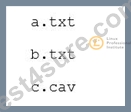
What would be the output of the following shell script?
for file in *.txt
- A. A.txt
- B. a b
- C. c.cav
- D. A. txt
- E. *.txt
- F. txt
Answer: D
Explanation:
Explanation
The shell script uses a for loop to iterate over the files that match the pattern *.txt in the current directory. The pattern *.txt means any file name that ends with .txt, regardless of the case. The loop body simply prints the value of the variable file, which holds the name of the current file in each iteration. Therefore, the output of the shell script would be the names of the files that end with .txt, one per line. In this case, the files are A.txt and b.txt, so the output would be:
a.txt b.txt
This corresponds to option E. The other options are incorrect for the following reasons:
* Option A: *.txt is not the output of the shell script, but the pattern that the loop uses to match the files.
The shell expands the pattern to the actual file names before executing the loop.
* Option B: a and b are not the names of the files, but the first characters of the file names. The loop prints the whole file name, including the extension.
* Option C: c.cav is not a file that matches the pattern *.txt, because it has a different extension. The loop ignores files that do not end with .txt.
* Option D: A.txt is only one of the files that matches the pattern *.txt, but not the only one. The loop prints both A.txt and b.txt.
References: 1: 9 Examples of for Loops in Linux Bash Scripts - How-To Geek 2 3: Looping Statements | Shell Script - GeeksforGeeks 1 4: shell - Loop through all the files with .txt extension in bash - Stack Overflow 5
NEW QUESTION # 28
What is defined by a Free Software license?
- A. A complete list of libraries required to compile the licensed software.
- B. Limits on the purposes for which the licensed software may be used.
- C. Conditions for modifying and distributing the licensed software.
- D. Details of the technical documentation each contributor has to provide.
- E. The programming languages which may be used to extend the licensed program.
Answer: C
Explanation:
Explanation/Reference:
NEW QUESTION # 29
Where is the operating system of a Raspberry Pi stored?
- A. On a read only partition on the Raspberry Pi's firmware, next to the BIOS.
- B. On rewritable flash storage which is built into the Raspberry Pi.
- C. On the master device attached to the Raspberry Pi's IDE bus.
- D. On a Linux extension module connected to the Raspberry Pi's GPIO pins.
- E. On a removable SD card which is put into the Raspberry Pi.
Answer: E
Explanation:
Explanation
The Raspberry Pi uses an SD card (or microSD card for newer models) as its main storage device. This means that the operating system and any other files are stored on the SD card, which can be easily inserted or removed from the Raspberry Pi. The SD card also allows the user to switch between different operating systems by using different cards or partitions. The Raspberry Pi does not have any internal storage, such as a hard disk drive or a solid state drive, nor does it use any external devices, such as an IDE bus, a firmware partition, or a GPIO module, to store the operating system. References:
* Raspberry Pi OS - Raspberry Pi
* Choosing Storage for Raspberry Pi - Kingston Technology
* Beginner's Guide: How To Install a New OS on Raspberry Pi
NEW QUESTION # 30
......
To prepare for the exam, candidates can take advantage of the many resources available, such as study guides, practice exams, and online courses. The Linux Essentials certification exam is an excellent way to validate your knowledge and skills in Linux and open-source software and can open up many opportunities in the IT industry.
Prepare With Top Rated High-quality 010-160 Dumps For Success in Exam: https://www.test4sure.com/010-160-pass4sure-vce.html
010-160 Free Certification Exam Easy to Download PDF Format 2025: https://drive.google.com/open?id=1ZOgYK9d5qbzkTIpuhw50a5rGR0Y_dA7-