

Real AZ-400 dumps - Real Microsoft dumps PDF in here [Oct-2026]
Realistic Test4Sure AZ-400 Dumps PDF - 100% Passing Guarantee
To prepare for the AZ-400 exam, candidates must have a solid understanding of Azure technologies and DevOps principles. They should have experience working with tools such as Azure DevOps, Visual Studio, and PowerShell, and should be familiar with concepts such as agile development, continuous integration and delivery, and infrastructure as code.
The Microsoft AZ-400 exam tests candidates on their ability to design and implement DevOps practices for different scenarios, including cloud-native applications, hybrid environments, and on-premises systems. It evaluates their proficiency in using various Azure tools and services, such as Azure DevOps, Azure App Service, Azure Kubernetes Service, Azure Container Instances, Azure Functions, and Azure Monitor. It also assesses their knowledge of industry-standard DevOps practices and frameworks, such as Agile, Scrum, Kanban, and Lean.
Microsoft AZ-400: Prerequisites
The candidates have two options of prerequisites to fulfill before they can go for the Microsoft AZ 400 exam. The first option requires that you first earn the Microsoft Certified: Azure Administrator Associate certificate. As for the second one, you should obtain Microsoft Certified: Azure Developer Associate. After meeting either of these prerequisites, you can proceed with this certification path.
NEW QUESTION # 105
You need to implement Project6.
Which three actions should you perform in sequence? To answer, move the appropriate actions from the list of actions to the answer area and arrange them m the correct order.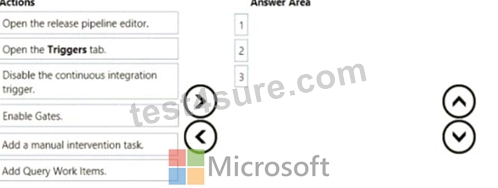
Answer:
Explanation: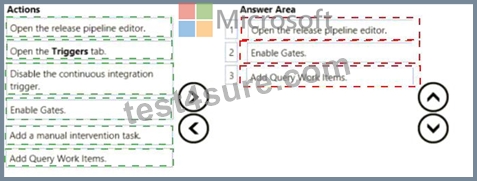
Explanation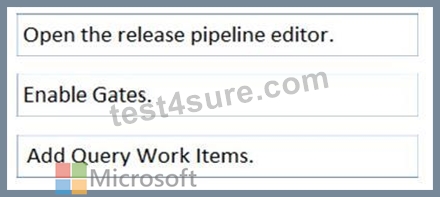
Scenario: Implement Project3, Project5, Project6, and Project7 based on the planned changes
Step 1: Open the release pipeline editor.
In the Releases tab of Azure Pipelines, select your release pipeline and choose Edit to open the pipeline editor.
Step 2: Enable Gates.
Choose the pre-deployment conditions icon for the Production stage to open the conditions panel. Enable gates by using the switch control in the Gates section.
Step 3: Add Query Work items.
Choose + Add and select the Query Work Items gate.
Configure the gate by selecting an existing work item query.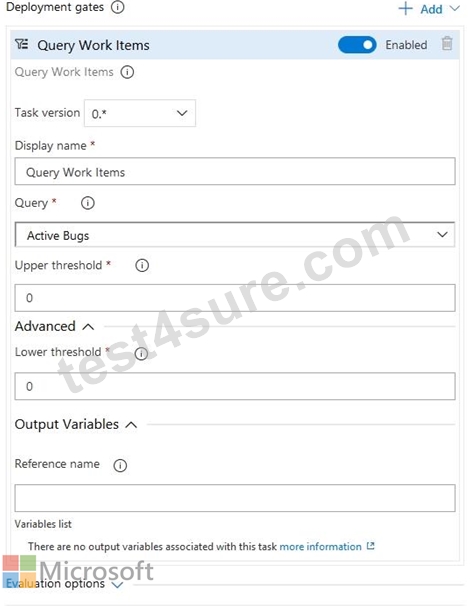
Note: A case for release gate is:
Incident and issues management. Ensure the required status for work items, incidents, and issues. For example, ensure deployment occurs only if no priority zero bugs exist, and validation that there are no active incidents takes place after deployment.
References:
https://docs.microsoft.com/en-us/azure/devops/pipelines/release/deploy-using-approvals?view=azure-devops#co
NEW QUESTION # 106
You need to configure Azure Automation for the computers in Pool7.
Which three actions should you perform in sequence? To answer, move the appropriate actions from the list of actions to the answer area and arrange them m the correct order.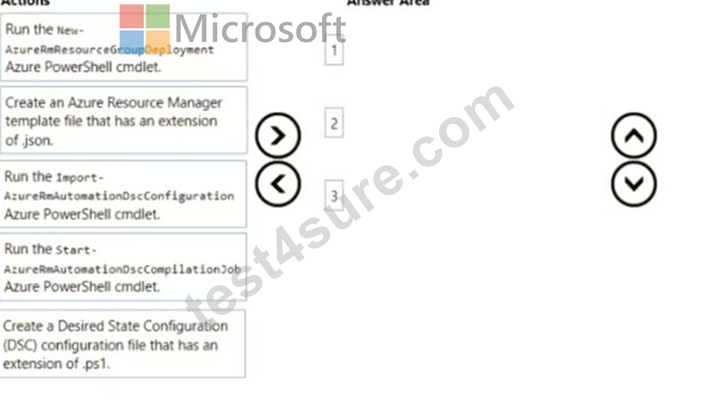
Answer:
Explanation: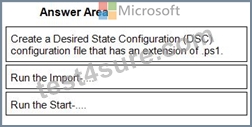
1 - Create a Desired State Configuration (DSC) configuration file that has an extension of .ps1.
2 - Run the Import-....
3 - Run the Start-....
NEW QUESTION # 107
You need to implement the code flow strategy for Project2 in Azure DevOps.
Which three actions should you perform in sequence? To answer, move the appropriate actions from the list of actions to the answer area and arrange in the correct order.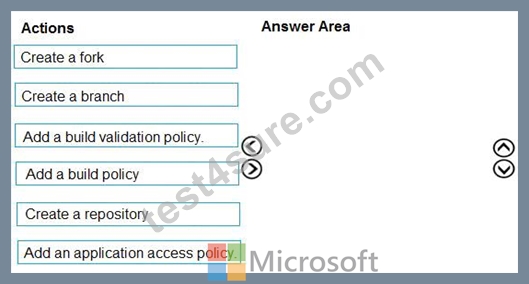
Answer:
Explanation: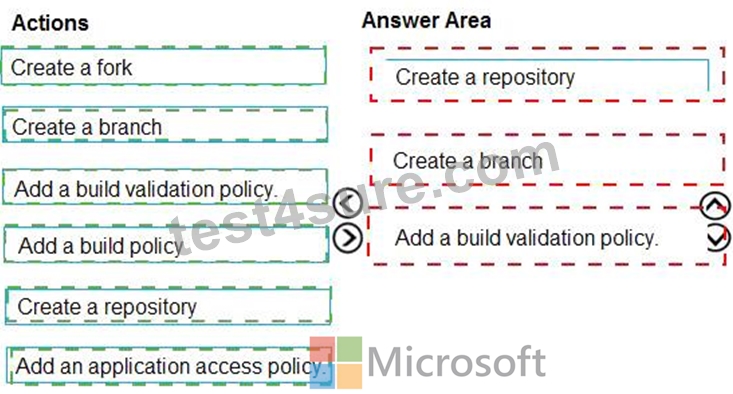
Explanation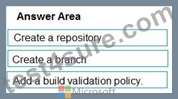
Step 1: Create a repository
A Git repository, or repo, is a folder that you've told Git to help you track file changes in. You can have any number of repos on your computer, each stored in their own folder.
Step 2: Create a branch
Branch policies help teams protect their important branches of development. Policies enforce your team's code quality and change management standards.
Step 3: Add a build validation policy
When a build validation policy is enabled, a new build is queued when a new pull request is created or when changes are pushed to an existing pull request targeting this branch. The build policy then evaluates the results of the build to determine whether the pull request can be completed.
Scenario:
Implement a code flow strategy for Project2 that will:
Enable Team2 to submit pull requests for Project2.
Enable Team2 to work independently on changes to a copy of Project2.
Ensure that any intermediary changes performed by Team2 on a copy of Project2 will be subject to the same restrictions as the ones defined in the build policy of Project2.
References: https://docs.microsoft.com/en-us/azure/devops/repos/git/manage-your-branches
NEW QUESTION # 108
You are creating a container for an ASP.NET Core app.
You need to create a Docker file to build the image. The solution must ensure that the size of the image is minimized How should you configure the file? To answer, drag the appropriate values to the correct targets. Each value may be used once, more than once, or not at all. You may need to drag the split bar between panes or scroll to view content.
NOTE: Each correct selection is worth one point.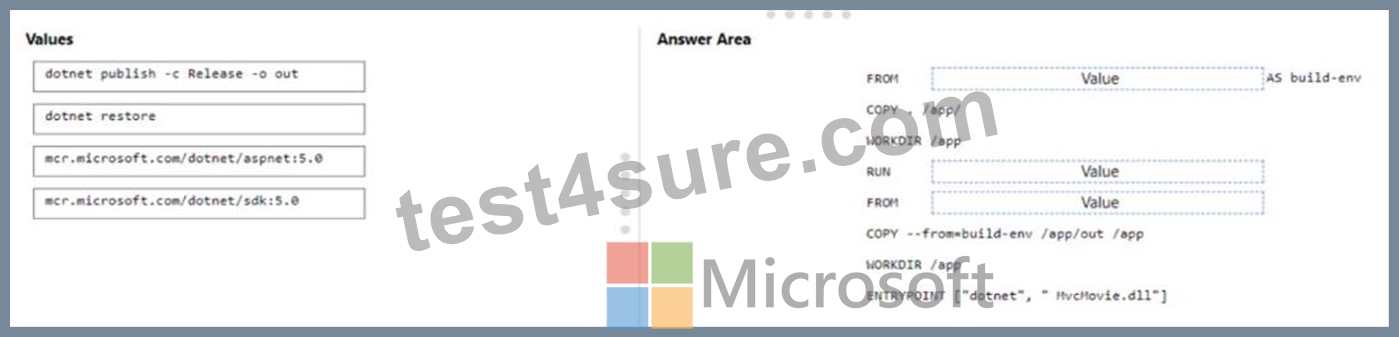
Answer:
Explanation: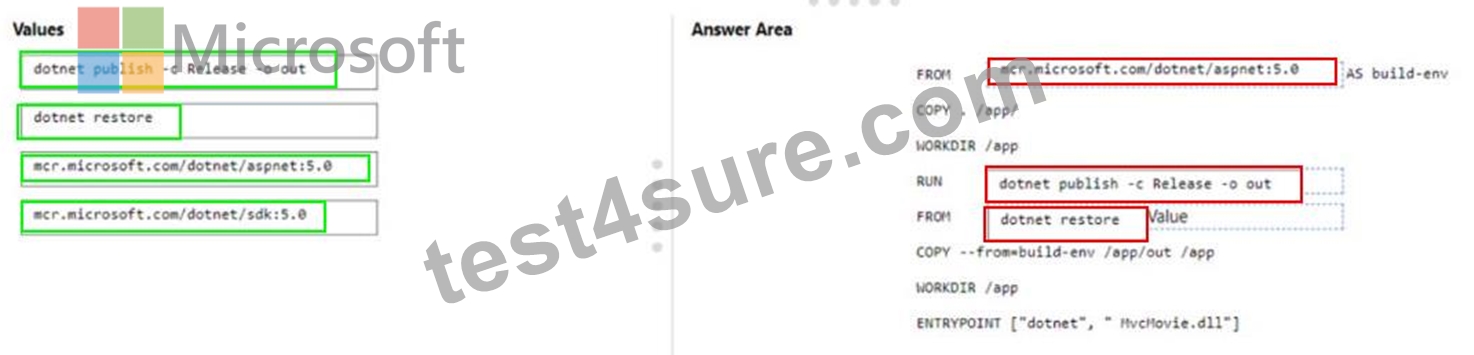
NEW QUESTION # 109
You have an Azure subscription that contains the resources shown in the following table.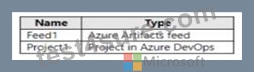
Project1 produces 9pm packages that are published to Feed1. Feed1 is consumed by multiple projects.
You need to ensure that only tested packages are available for consumption. The solution must minimize development effort.
What should you do?
- A. Create a feed view named @default. After the 9pm packages test successfully, configure a release pipeline that tags the packages as release.
- B. Create a feed view named @release and set @release as the default view. After the 9pm packages test successfully, configure a release pipeline that tags the packages as release.
- C. Create a feed view named @release and set @release as the default view After the 9pm packages test successfully, configure a release pipeline that promotes a package to the @release view.
- D. Create a feed view named @default. After the 9pm packages test successfully, configure a release pipeline that promotes a package to the @default view.
Answer: C
Explanation:
Explanation
By creating a feed view named "release" and setting it as the default view, packages that are published to the feed will not be immediately available for consumption. After the 9pm packages are tested successfully, you can configure a release pipeline that promotes a package to the @release view. This ensures that only tested packages are available for consumption and minimizes development effort as it doesn't require any additional steps to be taken by the consumer of the feed.
Reference:
Azure DevOps Docs: Create a feed and views
https://docs.microsoft.com/en-us/azure/devops/artifacts/feeds/create-feed?view=azure-devops Azure DevOps Docs: Promote a package
https://docs.microsoft.com/en-us/azure/devops/artifacts/feeds/promote-package?view=azure-devops
NEW QUESTION # 110
You have a private GitHub repository.
You need to display the commit status of the repository on Azure Boards.
What should you do first?
- A. Add the Azure Boards app to the repository.
- B. Configure multi-factor authentication (MFA) for your GitHub account.
- C. Add the Azure Pipelines app to the GitHub repository.
- D. Create a GitHub action in GitHub.
Answer: A
Explanation:
To connect Azure Boards to GitHub.com, connect and configure from Azure Boards. Or, alternatively, install and configure the Azure Boards app from GitHub. Both methods have been streamlined and support authenticating and operating via the app rather than an individual.
Note (see step 4 below):
Add a GitHub connection:
* Sign into Azure Boards.
* Choose (1) Project Settings, choose (2) GitHub connections and then (3) Connect your GitHub account.
* If this is your first time connecting to GitHub from Azure Boards, you will be asked to sign in using your GitHub credentials. Choose an account for which you are an administrator for the repositories you want to connect to.
* The Add GitHub Repositories dialog automatically displays and selects all GitHub.com repositories for which you are an administrator. Unselect any repositories that you don't want to participate in the integration.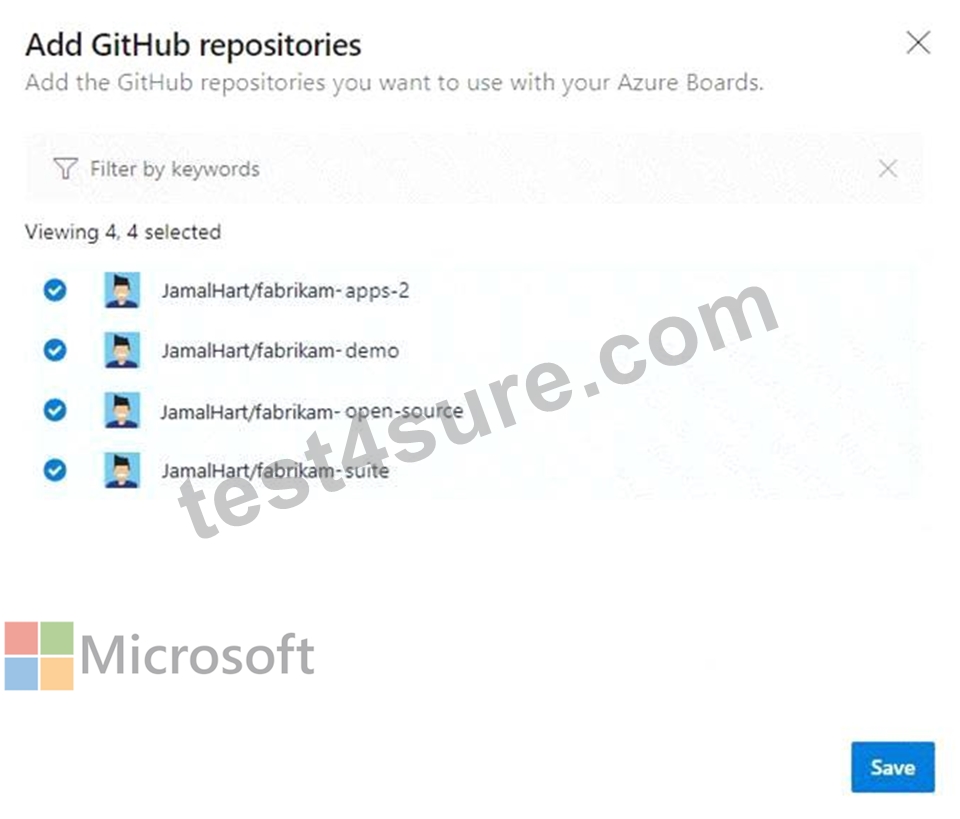
Reference:
https://docs.microsoft.com/en-us/azure/devops/boards/github/connect-to-github
NEW QUESTION # 111
You need to configure the alert for VM1. The solution must meet the technical requirements.
Which two settings should you configure? To answer, select the appropriate settings in the answer area.
NOTE: Each correct selection is worth one point.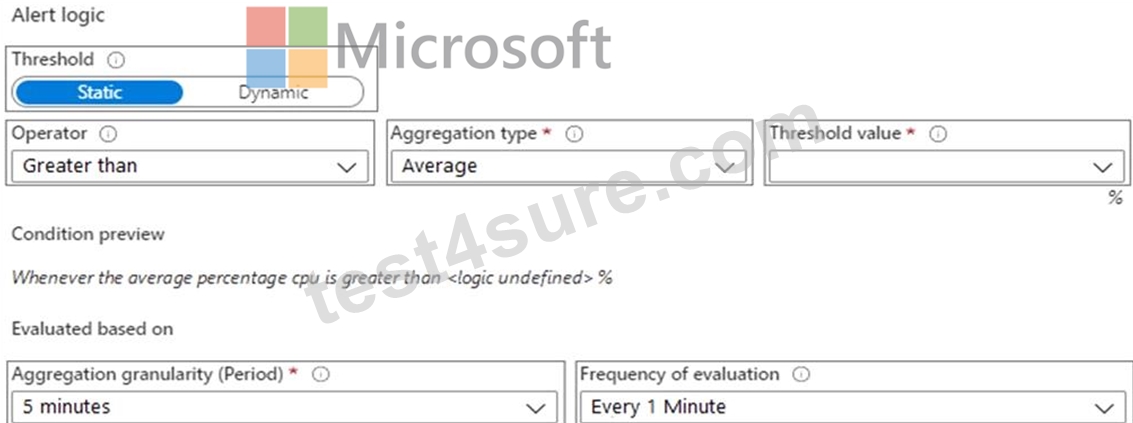
Answer:
Explanation: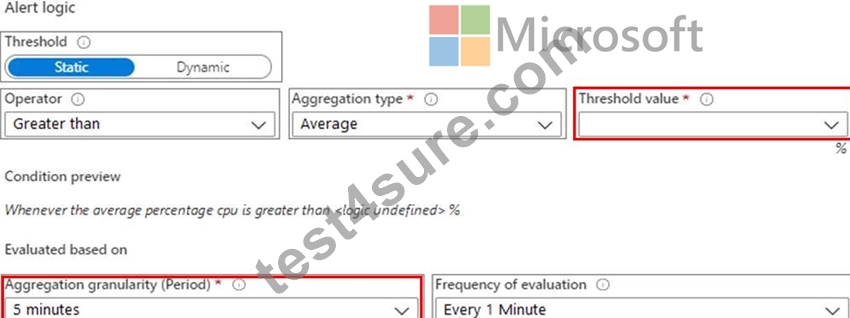
NEW QUESTION # 112
You have an Azure Key Vault that contains an encryption key named key1.
You plan to create a Log Analytics workspace that will store logging data.
You need to encrypt the workspace by using key1.
Which four actions should you perform in sequence? To answer, move the appropriate actions from the list of actions to the answer area and arrange them in the correct order.
Answer:
Explanation:
Explanation:
NEW QUESTION # 113
You need to configure Azure Automation for the computer in Group7.
Which three actions should you perform in sequence? To answer, move the appropriate actions from the list of actions to the answer area and arrange them in the correct order.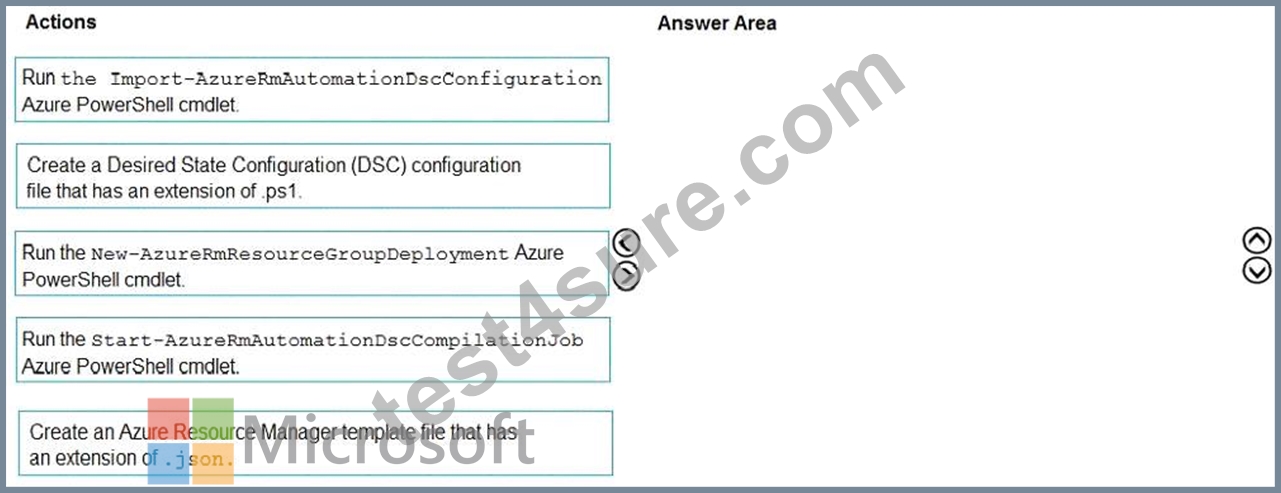
Answer:
Explanation: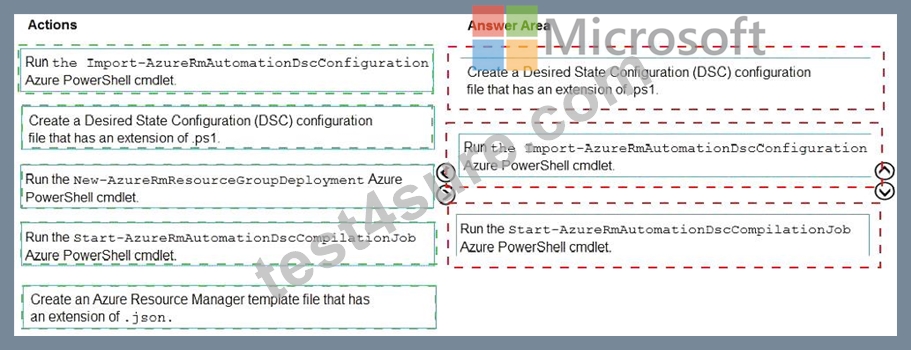
Explanation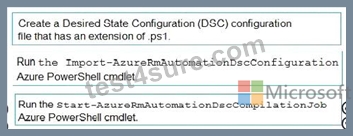
Step 1: Create a Desired State Configuration (DSC) configuration file that has an extension of .ps1.
Step 2: Run the Import-AzureRmAutomationDscConfiguration Azure Powershell cmdlet The Import-AzureRmAutomationDscConfiguration cmdlet imports an APS Desired State Configuration (DSC) configuration into Azure Automation. Specify the path of an APS script that contains a single DSC configuration.
Example:
PS C:\>Import-AzureRmAutomationDscConfiguration -AutomationAccountName
"Contoso17"-ResourceGroupName "ResourceGroup01" -SourcePath "C:\DSC\client.ps1" -Force This command imports the DSC configuration in the file named client.ps1 into the Automation account named Contoso17. The command specifies the Force parameter. If there is an existing DSC configuration, this command replaces it.
Step 3: Run the Start-AzureRmAutomationDscCompilationJob Azure Powershell cmdlet The Start-AzureRmAutomationDscCompilationJob cmdlet compiles an APS Desired State Configuration (DSC) configuration in Azure Automation.
References:
https://docs.microsoft.com/en-us/powershell/module/azurerm.automation/import-azurermautomationdscconfigur
https://docs.microsoft.com/en-us/powershell/module/azurerm.automation/start-azurermautomationdsccompilatio
NEW QUESTION # 114
A project team is using Azure Devops for building and deploying projects using pipelines. The application using this infrastructure is a Java based application.
You need to ensure a strategy is in place for managing technical debt.
Which of the following would you recommend? (Choose 2)
- A. Ensure to configure pre-deployment approvals in the deployment pipeline
- B. Carry out an integration between Azure Devops and SonarQube
- C. Ensure to configure post-deployment approvals in the deployment pipeline
- D. Carry out an integration between Azure Devops and Azure DevTest Labs
Answer: A,B
Explanation:
SonarQube is the perfect tool that can be used for measuring technical debt.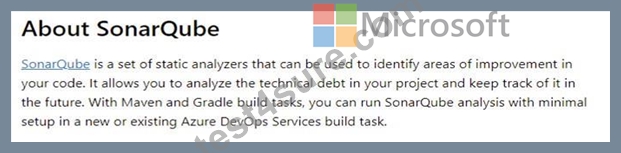
Then ensure to create a pre-deployment approval task so that the approver can view the technical debt before proceeding with the approval.
Option A is incorrect because Azure DevTest Labs cannot provide information on technical debt.
Option C is incorrect because you need to ensure the reviewer can review the technical debt first.
https://docs.microsoft.com/en-us/azure/devops/java/sonarqube?view=azure-devops
NEW QUESTION # 115
You plan to use Azure Kubernetes Service (AKS) to host containers deployed from images hosted in a Docker Trusted Registry.
You need to recommend a solution for provisioning and connecting to AKS. The solution must ensure that AKS is RBAC-enaWed and uses a custom service principal.
Which three commands should you recommend be run in sequence? To answer, move the appropriate commands from the list of commands to the answer area and arrange them in the coned order.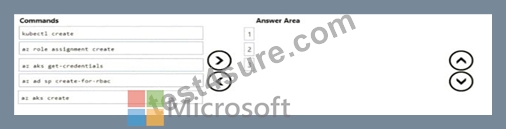
Answer:
Explanation: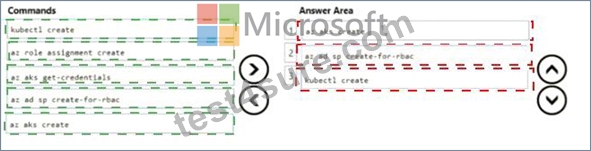
Explanation: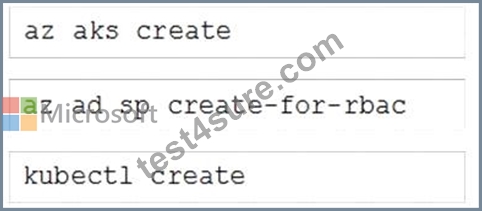
Step 1 : az acr create
An Azure Container Registry (ACR) can also be created using the new Azure CLI.
az acr create
--name <REGISTRY_NAME>
--resource-group <RESOURCE_GROUP_NAME>
--sku Basic
Step 2: az ad sp create-for-rbac
Once the ACR has been provisioned, you can either enable administrative access (which is okay for testing) or you create a Service Principal (sp) which will provide a client_id and a client_secret.
az ad sp create-for-rbac
--scopes
/subscriptions/<SUBSCRIPTION_ID>/resourcegroups/<RG_NAME>/providers/Microsoft.ContainerRegistry/re
--role Contributor
--name <SERVICE_PRINCIPAL_NAME>
Step 3: kubectl create
Create a new Kubernetes Secret.
kubectl create secret docker-registry <SECRET_NAME>
--docker-server <REGISTRY_NAME>.azurecr.io
--docker-email <YOUR_MAIL>
--docker-username=<SERVICE_PRINCIPAL_ID>
--docker-password <YOUR_PASSWORD>
References:
https://thorsten-hans.com/how-to-use-private-azure-container-registry-with-kubernetes
NEW QUESTION # 116
You are creating a container for an ASP.NET Core app.
You need to create a Docker file to build the image. The solution must ensure that the size of the image is minimized How should you configure the file? To answer, drag the appropriate values to the correct targets. Each value may be used once, more than once, or not at all. You may need to drag the split bar between panes or scroll to view content.
NOTE: Each correct selection is worth one point.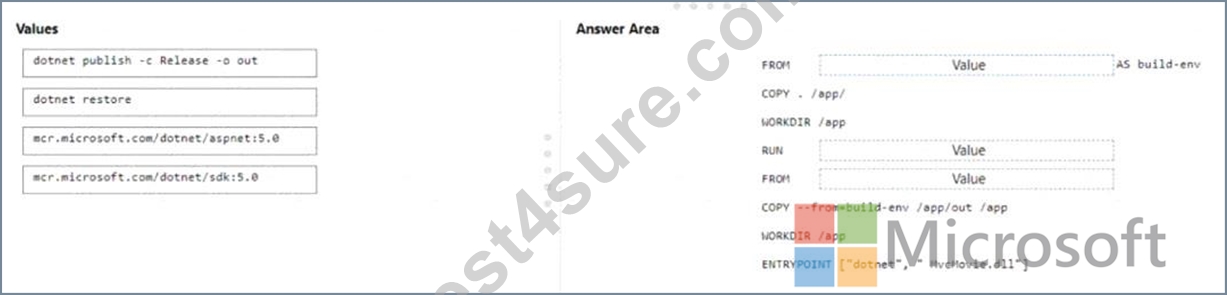
Answer:
Explanation: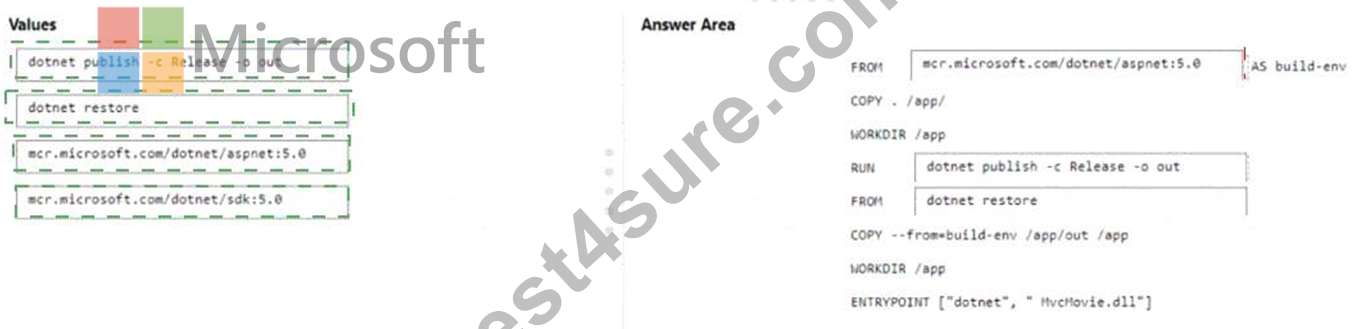
Explanation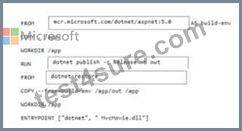
NEW QUESTION # 117
You need to configure GitHub to use Azure Active Directory (Azure AD) for authentication. What should you do first?
- A. Create an Azure Active Directory B2C (Azure AD B2C) tenant.
- B. Create a conditional access policy in Azure AD.
- C. Modify the Security settings of the GitHub organization.
- D. Register GitHub in Azure AD.
Answer: D
Explanation:
When you connect to a Git repository from your Git client for the first time, the credential manager prompts for credentials. Provide your Microsoft account or Azure AD credentials.
Note: Git Credential Managers simplify authentication with your Azure Repos Git repositories. Credential managers let you use the same credentials that you use for the Azure DevOps Services web portal. Credential managers support multi-factor authentication through Microsoft account or Azure Active Directory (Azure AD). Besides supporting multi-factor authentication with Azure Repos, credential managers also support two-factor authentication with GitHub repositories.
Reference:
https://docs.microsoft.com/en-us/azure/devops/repos/git/set-up-credential-managers
NEW QUESTION # 118
How should you complete the code to initialize App Center in the mobile application? To answer, select the appropriate options in the answer area.
NOTE: Each correct selection a worth one point.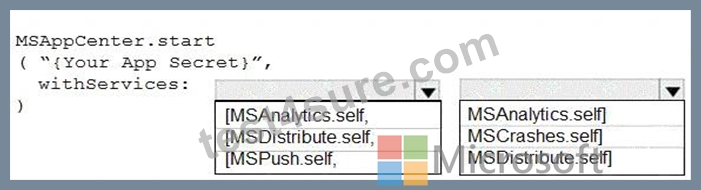
Answer:
Explanation: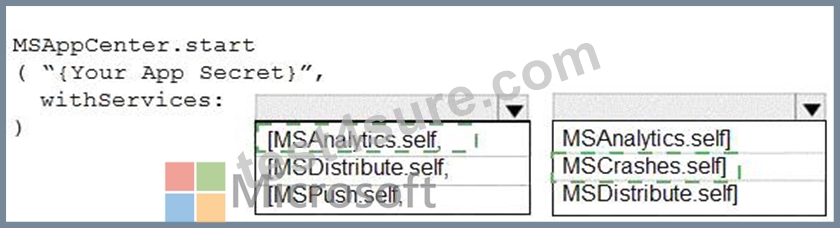
Explanation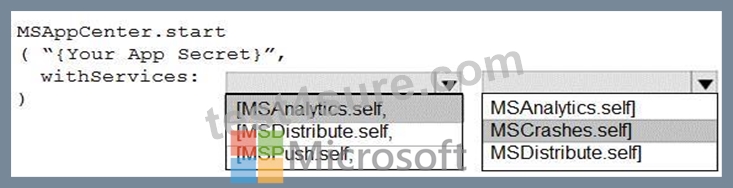
Scenario: Visual Studio App Center must be used to centralize the reporting of mobile application crashes and device types in use.
In order to use App Center, you need to opt in to the service(s) that you want to use, meaning by default no services are started and you will have to explicitly call each of them when starting the SDK.
Insert the following line to start the SDK in your app's AppDelegate class in the didFinishLaunchingWithOptions method.
MSAppCenter.start("{Your App Secret}", withServices: [MSAnalytics.self, MSCrashes.self]) References: https://docs.microsoft.com/en-us/appcenter/sdk/getting-started/ios
NEW QUESTION # 119
Your company uses GitHub for source control. GitHub repositories store source code and store process documentation. The process documentation is saved as Microsoft Word documents that contain simple flow charts stored as .bmp files.
You need to optimize the integration and versioning of the process documentation and the flow charts. The solution must meet the following requirements:
* Store documents as plain text.
* Minimize the number of files that must be maintained.
* Simplify the modification, merging, and reuse of flow charts.
* Simplify the modification, merging, and reuse of documents.
What should you include in the solution? To answer, select the appropriate options in the answer area. NOTE:
Each correct selection is worth one point.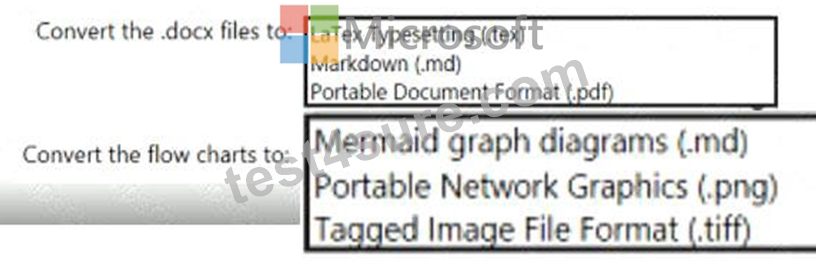
Answer:
Explanation: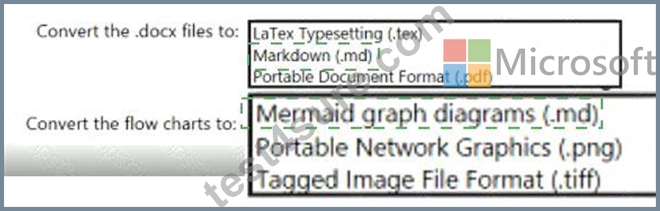
Explanation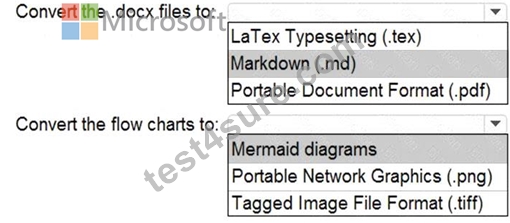
Box 1: Markdown (.md)
Github understands several text formats, including .txt and .md. .md stands for a file written in Markdown.
Box 2: Mermaid diagrams
Mermaid lets you create diagrams and visualizations using text and code.
It is a Javascript based diagramming and charting tool that renders Markdown-inspired text definitions to create and modify diagrams dynamically.
Reference:
https://ourcodingclub.github.io/tutorials/git/
https://mermaid-js.github.io/mermaid/#/
NEW QUESTION # 120
You have an Azure subscription that contains the resources shown in the following table.
Project1 produces 9pm packages that are published to Feed1. Feed1 is consumed by multiple projects.
You need to ensure that only tested packages are available for consumption. The solution must minimize development effort.
What should you do?
- A. Create a feed view named @default. After the 9pm packages test successfully, configure a release pipeline that tags the packages as release.
- B. Create a feed view named @release and set @release as the default view. After the 9pm packages test successfully, configure a release pipeline that tags the packages as release.
- C. Create a feed view named @release and set @release as the default view After the 9pm packages test successfully, configure a release pipeline that promotes a package to the @release view.
- D. Create a feed view named @default. After the 9pm packages test successfully, configure a release pipeline that promotes a package to the @default view.
Answer: C
Explanation:
By creating a feed view named "release" and setting it as the default view, packages that are published to the feed will not be immediately available for consumption. After the 9pm packages are tested successfully, you can configure a release pipeline that promotes a package to the @release view. This ensures that only tested packages are available for consumption and minimizes development effort as it doesn't require any additional steps to be taken by the consumer of the feed.
Reference:
Azure DevOps Docs: Create a feed and views
https://docs.microsoft.com/en-us/azure/devops/artifacts/feeds/create-feed?view=azure-devops Azure DevOps Docs: Promote a package
https://docs.microsoft.com/en-us/azure/devops/artifacts/feeds/promote-package?view=azure-devops
NEW QUESTION # 121
You are deploying a new application that uses Azure virtual machines.
You plan to use the Desired State Configuration (DSC) extension on the virtual machines.
You need to ensure that the virtual machines always have the same Windows features installed.
Which three actions should you perform in sequence? To answer, move the appropriate actions from the list of actions to the answer area and arrange them in the correct order.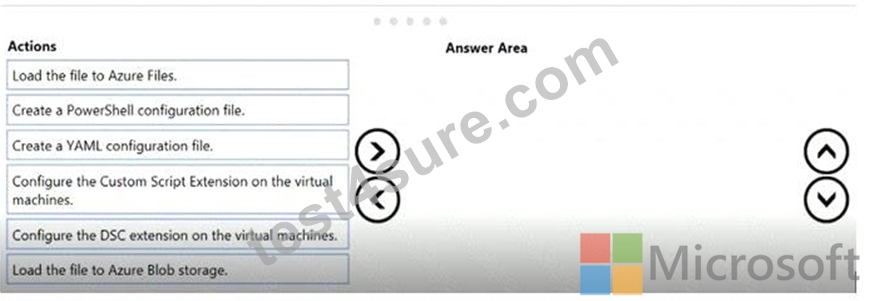
Answer:
Explanation: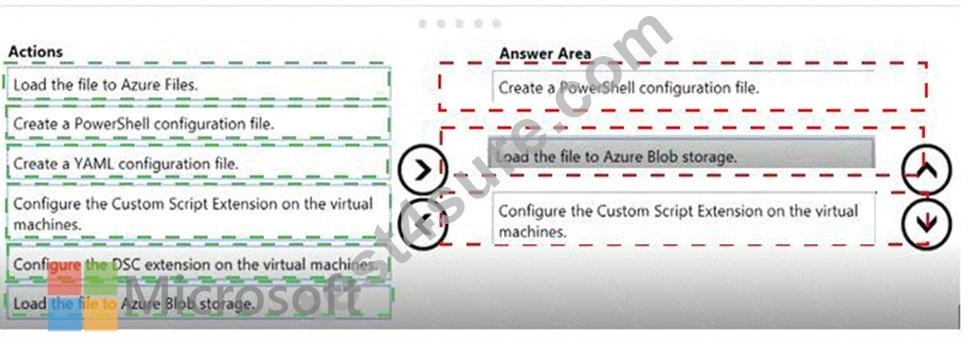
Explanation: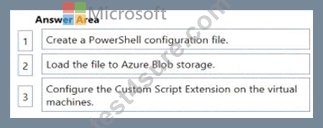
Step 1: Create a PowerShell configuration file
You create a simple PowerShell DSC configuration file.
Step 2: Load the file to Azure Blob storage
Package and publish the module to a publically accessible blob container URL Step 3: Configure the Custom Script Extension on the virtual machines.
The Custom Script Extension downloads and executes scripts on Azure virtual machines.
Reference:
https://docs.microsoft.com/en-us/azure/automation/automation-dsc-getting-started
https://docs.microsoft.com/en-us/azure/virtual-machines/extensions/custom-script-windows
NEW QUESTION # 122
You have an Azure Repos repository named repo1.
You need to clone repo1. The solution must clone only a directory named src/web.
How should you complete the script? To answer, drag the appropriate values to the correct targets, Each value may be used once, more than once, or not at all. You may need to drag the spirt bar between panes or scroll to view content.
NOTE: Each correct selection is worth one point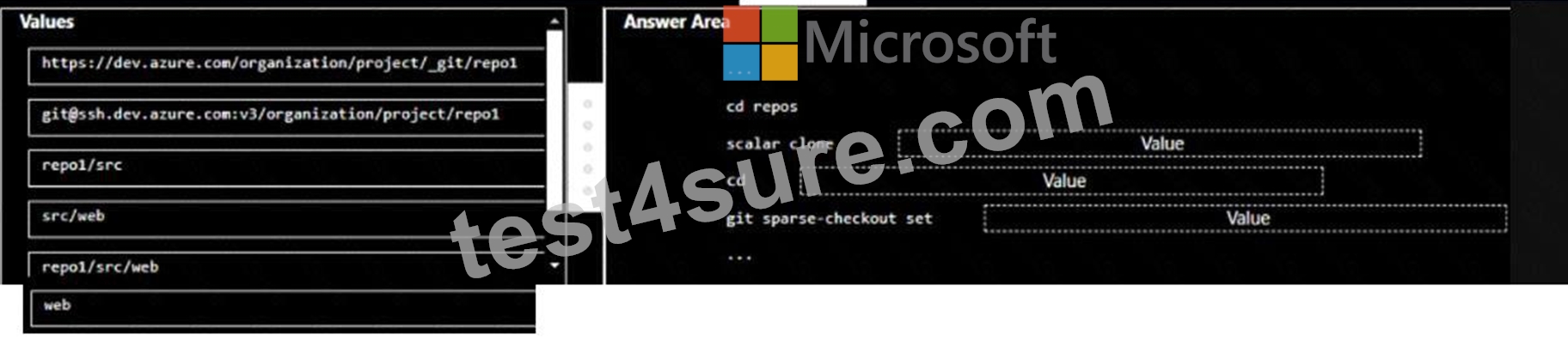
Answer:
Explanation: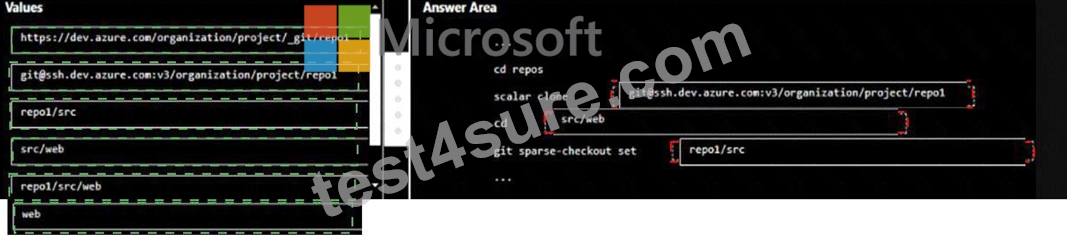
Explanation
Text Description automatically generated with medium confidence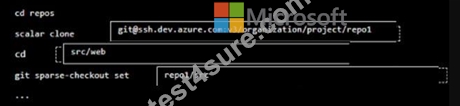
NEW QUESTION # 123
......
Verified AZ-400 dumps Q&As Latest AZ-400 Download: https://www.test4sure.com/AZ-400-pass4sure-vce.html
Free Microsoft AZ-400 Exam Questions and Answer: https://drive.google.com/open?id=1Fj0TzzyCogIJcRutA489uexgmG8QHBik